Everything you need to share a flight clearly
FlightMessenger turns a flight number into a clear update your family and friends can read in any messaging app, plus a live page they can open in any browser. No app to install, for you or for them.
A flight message written for you
Add your flight number and date and FlightMessenger writes a tidy update: departure and arrival times in local timezones, flight duration, airline and aircraft. Copy it into WhatsApp, iMessage, email or any other app and send it to the people waiting for you.
A live tracking page anyone can open
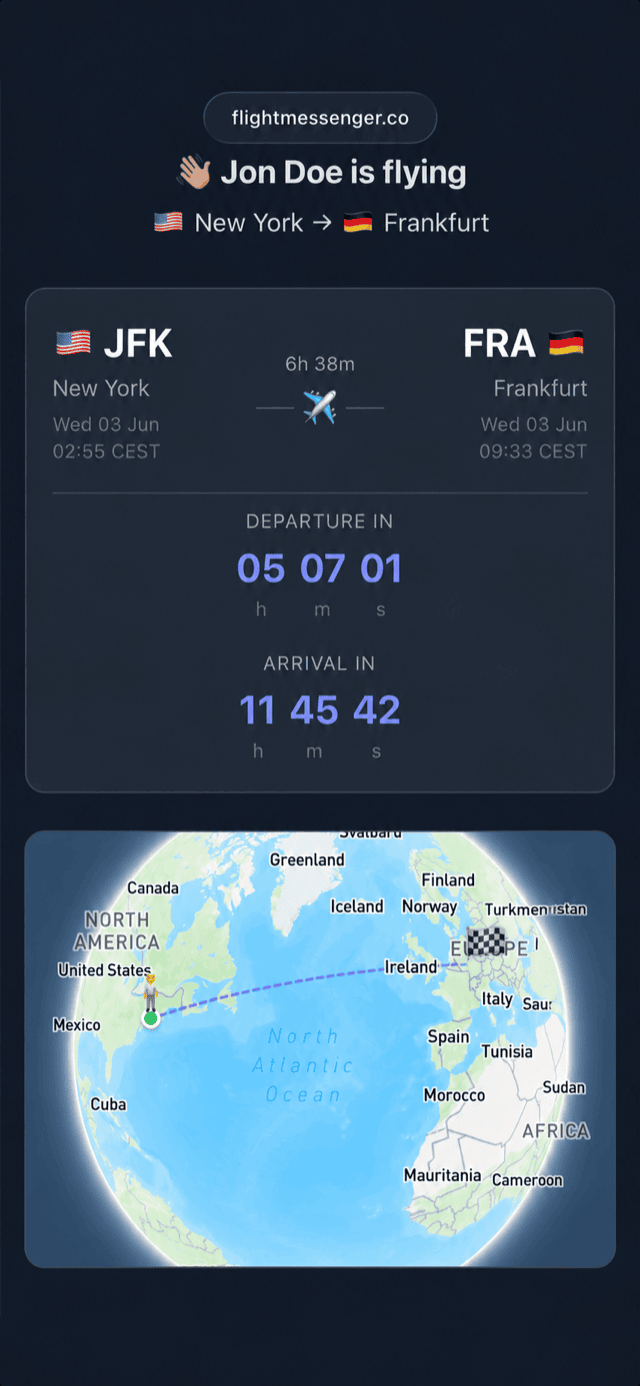
Every flight gets its own shareable page with live status, countdowns for takeoff and landing, an in-flight progress bar and a 3D globe that follows the journey. Recipients open it straight in their browser, without an account.
Weather and a fun fact about your destination
Messages can include the current weather where you land and an AI-generated fun fact about the place you are travelling to. You choose whether to include them, and whether to add the live tracking link.
Automatic refresh before departure
Schedule a flight days or weeks ahead and you get a first message right away. About 12 hours before departure, FlightMessenger checks the flight again and emails you an updated message with the latest details, weather and fun fact.
Your personal flight map and statistics
Every route and airport you have visited fills in on an interactive 3D globe. The statistics dashboard shows your total time in the air, most flown airlines and routes, airports, countries and aircraft types.
Review delays in your own flight history
The Delays view in Statistics summarizes recorded delays with a total count, average delay and longest delay, then breaks the history down by airline. Delay statistics are based on flights logged since November 15, 2025, so earlier flights are not included.
Get a quarterly recap of your flying
After a calendar quarter with logged flights, FlightMessenger can email you a recap of your flights, distance and time in the air, new destinations and travel favorites. Manage quarterly recap emails in Settings under Emails & notifications.
Travel with friends
Invite the people you fly with by email, tag them on a new flight or add them to a past trip. Once you are connected, you can see the history of the flights you have taken together.
Import and export your flight history
Already flown a hundred flights? Import your history from a CSV file or add flights by hand, and your map and statistics update right away. Export your complete history back to CSV whenever you like.
What's in development
We are working on push notifications and delay alerts, badges and achievements, and an annual Year in Review. These features are not available yet.
Frequently asked questions
Do the people I share my flight with need an account?
No. The flight message is plain text and the live tracking page opens in any browser, so recipients do not need an account or an app.
Can I choose what goes into the message?
Yes. The core flight details are always included. You can turn the weather, the fun fact and the live tracking link on or off.
Does FlightMessenger work on my phone?
Yes. FlightMessenger is a web app that works on phones, tablets and computers with a modern browser.
Explore individual features
FlightMessenger guides
- How to share your flight status with family Compare four ways to share your flight status with family: airline apps, flight tracker links, location sharing and FlightMessenger. Step by step, with tips.
- How to track someone else's flight Learn how to track a friend's or family member's flight: what information you need, where to find live status, how to read delays and what to do without a flight number.
- Flight delayed and someone is picking you up? Here is what to do Your flight is delayed and someone is collecting you at the airport. How to keep your pickup informed, when they should leave home and how long arrivals really takes.
- How to share a flight tracker link that needs no app Why a browser link is the easiest way for family to follow your flight, what a good tracking link shows and how to send one without anyone installing an app.
- What time will I land in local time? Time zones explained Work out your arrival time in local time, understand +1 days, daylight saving time and the date line, and tell people at home when you really land.
- Invite friends and build a shared flight history Learn how to invite a friend, accept a request, share a new or past flight, and view your shared travel history.
- Read your flight delay statistics Find the Delays view in Statistics and understand total delays, average and longest delay, and airline-level details.
- Explore your routes on the Flight Map Open your Flight Map, follow route lines, and tap airports or routes to see visits and flight-history details.
- Manage your quarterly flight recaps Learn what a quarterly recap contains and how to turn FlightMessenger recap emails on or off in notification settings.
- Schedule a flight before departure Add an upcoming flight by flight number and date, share its update, and learn when FlightMessenger refreshes details before departure.
- Export your logged flights to CSV Download a CSV of your logged flights from FlightMessenger Settings and open the file in a spreadsheet or keep it as a backup.
Create a free account