How to track and share a Delta, United or American Airlines flight
Updated
The quickest way to track a Delta, United or American Airlines flight and keep your family informed is one live link. Add the flight number and date to FlightMessenger, and you get a clear message plus a tracking page that anyone can open in a browser. This guide shows the steps, how to enter flights from each airline and its regional partners, and when the airline's own tools are enough.
What you need before you start
You need the same two details for any airline:
- The flight number, for example DL 1234, UA 925 or AA 100. The two letters are the airline code: DL for Delta, UA for United and AA for American.
- The date of the flight, in the local time of the departure airport.
If you are tracking someone else's flight, ask them for these two details. A city name is not enough, because there can be many flights between two cities on the same day. Better still, ask the traveler to send you a FlightMessenger link, so you do not have to look anything up. Our guide on how to track someone else's flight explains the other options.
Step by step: track and share the flight with FlightMessenger
- Create your free FlightMessenger account. You only need an email address.
- Add the flight with its number and date, for example DL 1234 on the day you fly.
- Check the details FlightMessenger finds: route, airline, aircraft and departure and arrival times in local time.
- Choose what to include in the message, such as the live tracking link, the weather at your destination and a fun fact.
- Copy the message and send it by WhatsApp, iMessage, text or email to the people waiting for you.
If you add the flight more than a day ahead, FlightMessenger checks it again about 12 hours before departure and emails you a refreshed message. Send that one too, so the times are current.
What your family sees on the live page
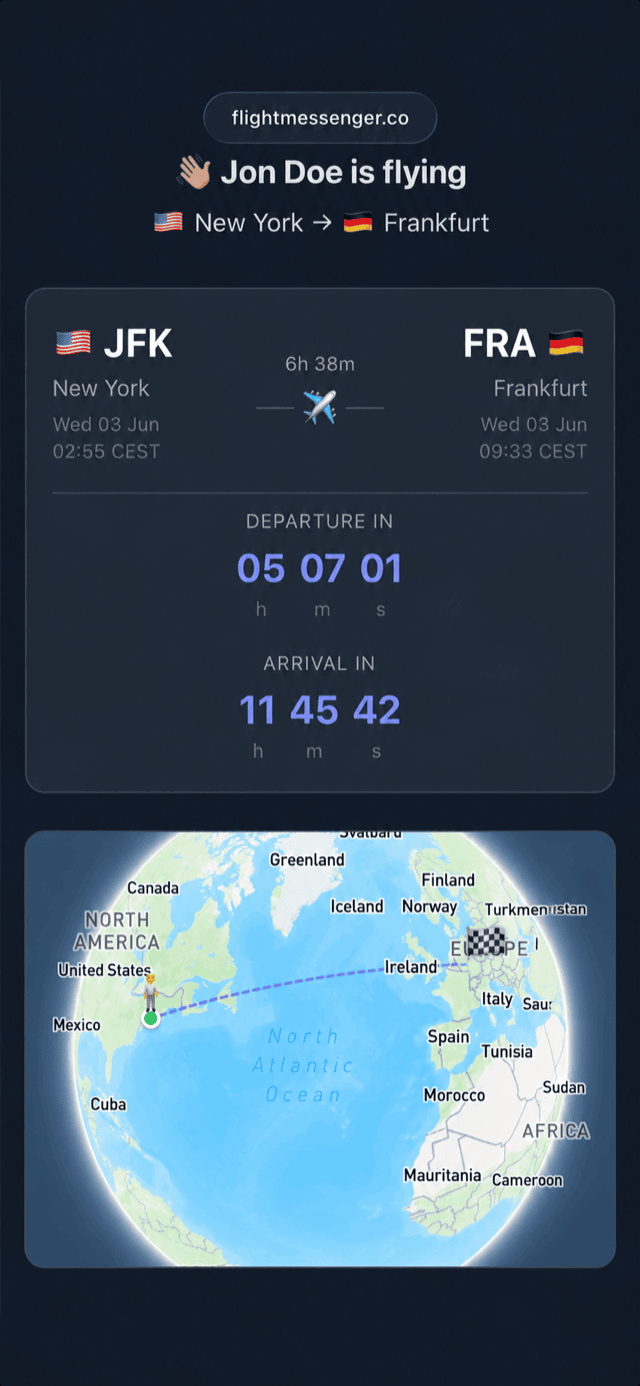
The tracking page opens in any browser, without an account or an app. It is the same page for a Delta, United or American flight, so your family learns it once. It shows:
- The current status: on time, delayed, in the air or landed
- Departure and arrival times in the local time of each airport
- A countdown to takeoff and landing
- An in-flight progress bar and a globe that follows the journey
Your family can open the page as often as they like. You do not have to send updates from the gate or after you land at a connection.
Delta, United and American flight numbers to enter
Enter the flight number of the airline that operates the flight. For most mainline flights, that is the number on your ticket.
Regional flights need more care. Delta Connection, United Express and American Eagle flights are flown by regional partners, but they usually keep the DL, UA or AA flight number. Some international legs are flown by a partner airline in the same alliance, and the booking shows a line such as "operated by". In that case, add the flight with the operating airline's own flight number.
For a trip with a connection, add every leg as a separate flight. If you change planes in Atlanta, Chicago or Dallas, your family can then see whether the first flight is late and whether the second one leaves on time. Tell them the final arrival time, not the time you land at the connection airport.
Why one link is easier than airline alerts
Delta, United and American all show flight status on their websites and apps, and each offers alerts. They work well if you fly one airline and everyone at home is happy to use that airline's system. They have limits when you want to keep a family informed:
- Every airline does it differently. If you fly Delta in spring and United in autumn, your family has to learn two systems.
- Some alerts only go to phone numbers in certain countries, to one extra contact or to people on the booking.
- Connections on a partner airline often do not appear in the first airline's alerts.
- An itinerary email or a screenshot does not update when the flight changes.
A FlightMessenger link works the same way for any airline. Your family gets one message they can read at a glance and one page they can check whenever they want.
Tips for the day you fly
Send your message the day before, with the final times and the tracking link. Most changes to times and gates happen in the last few hours, and the live page shows them without another message from you.
If someone is picking you up, ask them to watch the estimated arrival time on the live page, not the scheduled one, and to allow time to get from the gate to the curb. Our guide to delayed pickups explains how to plan the drive.
If your flight is cancelled and you are rebooked, you get a new flight number. Add the new flight to FlightMessenger and send the new link as soon as you have it, because the old number stops showing useful information.